
How to Install RPM Packages on Ubuntu 24.04
In this tutorial, we will explain how to install RPM packages on the Ubuntu 24.04 operating system. Yes, that’s right, you read that very well. It is possible to install Red Hat-based derivatives on a Debian-based system. RPM, or Red Hat Package Manager, is a free and open-source package management system for installing, removing, and managing software packages in Linux. RPM is a package format used by Red Hat derivatives, such as CentOS, Fedora, RHEL, and AlmaLinux. In this blog post, we will focus on installing these packages on the latest Debian-based Ubuntu 24.
Prerequisites
- A server running Ubuntu 24.04 OS
- User privileges: root or non-root user with sudo privileges
Update the System
Before installing the RPM packages, it is recommended to update the system packages to their latest available versions. To do that, execute the following command:
The RPM packages. .rpm cannot be installed on Ubuntu systems with the basic command apt install example.rpm. Therefore, the .rpm packages need to be converted to a .deb file OR installed with the help of the alien command. In both cases, we need Alien.
Alien is a handy tool for converting between the Red Hat and Debian-based systems. We can convert .rpm to .deb, .deb to .rpm, and also Solaris, Stampede, and Slackware files. However, in this tutorial, we will focus on converting from .rpm to .deb.
Alien by default is included in the Ubuntu 24.04 repository, so that we can install it with the command below:
alien -V
You should get the following output:

Convert RPM to DEB
As we mentioned previously, one way to install .rpm packages on Ubuntu 24 is to first convert them to .deb packages. To do that, let’s first download a .rpm package:
alien hello-2.12.3-1.el10_3.x86_64.rpm
If everything is OK, you should get output similar to this:
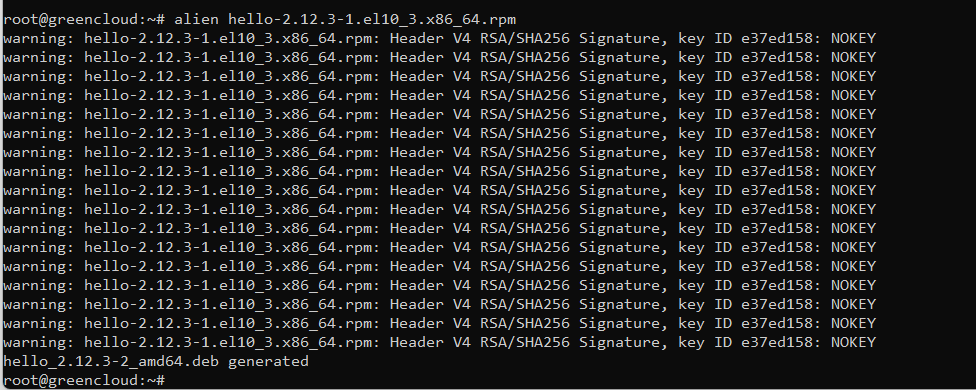
To install the RPM package on Ubuntu 24.04 without conversion, you can use the following command:
You can use the examples above to install an RPM package on Ubuntu 24.04, but be aware that installing packages not initially designed for the current system may fail or cause incompatibilities with other software on your server. However, it is worth trying to install them this way.
That’s it. You successfully installed the RPM packages on Ubuntu 24.04.
