
How to Add Audit Rules for Auditd on AlmaLinux 9
System administrators and security professionals often face the challenge of monitoring critical activities on their Linux systems. Auditd, the Linux Audit daemon, is a vital tool that logs system events, making it invaluable for compliance, security, and troubleshooting. A core feature of auditd is its ability to enforce audit rules, which specify what activities should be monitored on a system.
In this article, we’ll explore how to add audit rules for auditd on AlmaLinux. From setting up auditd to defining custom rules, you’ll learn how to harness auditd’s power to keep your system secure and compliant.
What Are Audit Rules?
Audit rules are configurations that instruct auditd on what system events to track. These events can include:
- File accesses (read, write, execute, etc.).
- Process executions.
- Privilege escalations.
- System calls.
- Login attempts.
Audit rules can be temporary (active until reboot) or permanent (persist across reboots). Understanding and applying the right rules is crucial for efficient system auditing.
Getting Started with auditd
Before configuring audit rules, ensure auditd is installed and running on your AlmaLinux system.
Step 1: Install auditd
Auditd is typically pre-installed. If it’s missing, install it using:
Step 2: Start and enable auditd
Start the audit daemon and ensure it runs automatically at boot:
Step 3: Verify Status
Check if auditd is active:
systemctl status auditd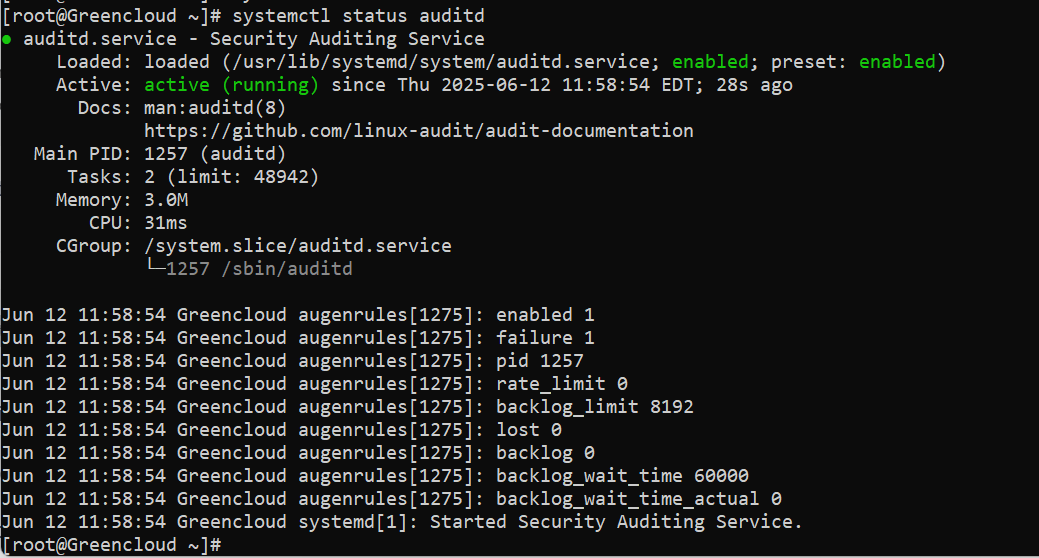
Step 4: Test Logging
Generate a test log entry by creating a file or modifying a system file. Then check /var/log/audit/audit.log for corresponding entries.
Types of Audit Rules
Audit rules are broadly classified into the following categories:
- Control Rules
Define global settings, such as buffer size or failure handling. - File or Directory Rules
Monitor access or changes to specific files or directories. - System Call Rules
Track specific system calls, often used to monitor kernel interactions. - User Rules
Monitor actions of specific users or groups.
Adding Temporary Audit Rules
Temporary rules are useful for testing or short-term monitoring needs. These rules are added using the auditctl command and remain active until the system reboots.
Example 1: Monitor File Access
To monitor all access to /etc/passwd, run:
Example 2: Monitor Directory Changes
To track modifications in the /var/log directory:
To monitor the chmod system call, which changes file permissions:
Explanation:
-a always,exit: Log all instances of the event.-F arch=b64: Specify the architecture (64-bit in this case).-S chmod: Monitor thechmodsystem call.-k chmod_monitor: Add a key for identification.
Making Audit Rules Permanent
Create a rule file.
nano /etc/audit/rules.d/50-custom.rules
-a always,exit -F arch=b64 -F path=/etc/passwd -F perm=rwxa -k passwd_monitor
-a always,exit -F arch=b32 -F path=/etc/passwd -F perm=rwxa -k passwd_monitor

-a always,exit -F dir=/var/www -F perm=wa -k web_changes

-a always,exit -F arch=b64 -S execve -k exec_monitor
-a always,exit -F arch=b32 -S execve -k exec_monitor
Load rules
augenrules --load
systemctl restart auditd
check
auditctl -l
Once audit rules are in place, their corresponding logs will appear in /var/log/audit/audit.log. Use the ausearch utility to query these logs.
Example 1: Search by Key
To find logs related to the passwd_monitor rule:
Example 2: Search by Time
To view logs generated within a specific timeframe:
Advanced Audit Rule Examples
1. Monitor User Logins
To monitor login attempts by all users:
2. Track Privileged Commands
To monitor the execution of commands run with sudo:
- Focus on Critical Areas
Avoid overloading your system with excessive rules. Focus on monitoring critical files, directories, and activities. - Use Meaningful Keys
Assign descriptive keys to your rules to simplify log searches and analysis. - Test Rules
Test new rules to ensure they work as expected and don’t generate excessive logs. - Rotate Logs
Configure log rotation/etc/audit/auditd.confto prevent log files from consuming too much disk space. - Secure Logs
Restrict access to audit logs to prevent tampering or unauthorized viewing.
Troubleshooting Audit Rules
- Rules Not Applying
If a rule doesn’t seem to work, verify syntax in the rules file and check for typos. - High Log Volume
Excessive logs can indicate overly broad rules. Refine rules to target specific activities. - Missing Logs
If expected logs aren’t generated, ensure auditd is running and the rules file is correctly configured.
Conclusion
Audit rules are a cornerstone of effective system monitoring and security on AlmaLinux. By customizing rules with auditd, you can track critical system activities, ensure compliance, and respond quickly to potential threats.
Start by adding basic rules for file and user activity, and gradually expand to include advanced monitoring as needed. With careful planning and regular review, your audit rules will become a powerful tool in maintaining system integrity.
Do you need guidance on specific audit rules or on integrating audit logs into your security workflows? Please let us know, and we’ll help you enhance your audit strategy.
