
How to turn off automatic Windows updates on Windows Server 2012, 2019
1. Run Command Prompt as Administrator
2. Type sconfig and press Enter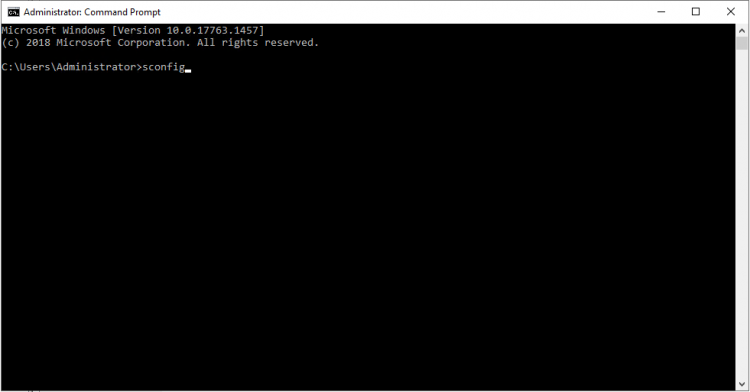
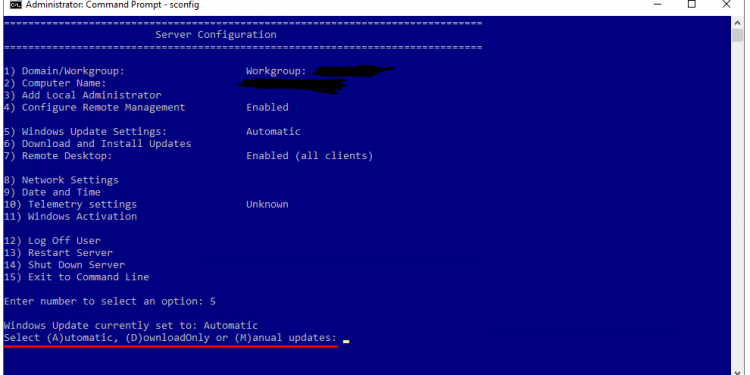
3. You can now see the current settings as shown below >> type 5 and Enter >> you will get the available option:
- Type M to turn off the automatic Windows Update Settings to Manual
- Once you change this, the Windows Server will not be updated automatically

1. Open the Server Manager through the taskbar

2. In the “Server Manager”, click on “Local Server“. Then in the Properties panel – click on “Install updates automatically using Windows Update“
 3.In the new window, select “Change Settings“
 4.Then from the section “Important updates“, (1) select “Never check for updates” and (2) uncheck “Give me recommended updates…” and (3) click OK
 5.Now you have disabled the system updates

